

Let's cut to the chase: if you're a diesel heater user (or someone looking to buy one) who's already got a smart home setup, you've probably wondered at some point-can I plug that 220V diesel heater into Alexa, Google Home, whatever? We've spent the last few years in the diesel heater business, supplying everything from 12V truck heaters to 240V models for garage workshops or tiny homes, so we've heard this question a hundred times. Today, we're breaking it down real, no B.S. style, including the nitty-gritty, what works, what doesn't, and how to make it actually happen (if it's even worth your time).
First, let's get one thing straight: not all diesel heaters are created equal. For context, most standard diesel heaters fall into a couple of voltage buckets-12V for small vans or boats, 24V for semi-trucks, 110V for US garages, and 220V for EU, AU, and most of the rest of the world. We sell a ton of these, and you can check out our full line of 12v 24v 240v Diesel Heater models if you need a baseline, but the key here is the 220V unit's internal wiring and control system.
Here's the hard truth most salespeople won't tell you: a stock 220V diesel heater-like the ones you'd mount in a truck sleeper, a tiny home, or a workshop-wasn't built with smart home compatibility out of the box. Most basic 220V models use a simple analog or basic digital control panel: turn a dial, press a few buttons, set a temperature, and that's it. No Wi-Fi, no Bluetooth, no way to send signals to your home assistant. So if you grabbed a random 220V heater from Amazon last week and tried to sync it with Alexa? It's not gonna work, at least not without some mods.
Does that mean it's impossible? Not by a long shot. We've seen a lot of customers pull this off, but it depends on a few factors. Let's break down what you actually need to make this work, step by step.
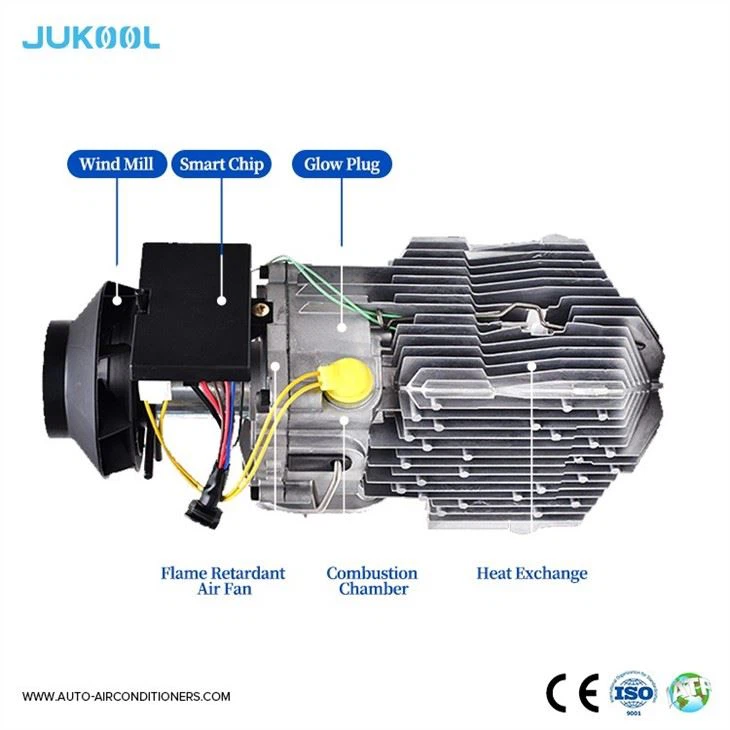
First, you need to understand how a 220V diesel heater operates. At its core, a diesel heater has three main parts tied to control: the fuel pump (which pushes diesel into the combustion chamber), the fan (which blows hot air into your space), and the thermostat (which cuts power when it hits your set temp). Most stock 220V heaters have a solid-state relay (or a manual switch) that controls when power goes to these components. The goal here is to piggyback on that switch, so your smart home system can trigger that relay instead of you hitting a physical button.
That's where the hardware comes in. The easiest way to do this is with a smart plug. Not just any smart plug, though. You need a smart plug that can handle at least the same amperage as your heater. Most 220V diesel heaters draw between 10A and 20A, so a basic smart plug for a lamp won't cut it. You need a heavy-duty smart plug rated for 220V, like ones made for space heaters or dryers. Plug your heater into that smart plug, and sync the plug with your Alexa, Google Home, or whatever hub you use. Boom-now you can turn your heater on/off with your voice, set schedules, all that basic smart stuff. There is a catch, though.
What about temperature control? Most basic smart plugs only do on/off, so if you want your heater to turn off when it hits 70 degrees, you're out of luck with just a plug. That's where things get more complex. If you want full smart functionality-set temps, adjust fan speed, get alerts if the heater cuts out-you'll need to get a smarter control module for your 220V heater, or upgrade the heater itself. For example, some of our higher-end 220V models come with built-in Wi-Fi modules, which sync directly with smart home apps without any extra hardware. If you're in the market for that, our Diesel Sleeper Heater For Truck line has a few Wi-Fi-enabled options that work seamlessly with Amazon's ecosystem, no mods needed.
Next, voltage compatibility, because that's a huge headache for a lot of people. 220V heaters are built for a specific grid, so if you're trying to hook one up to a smart home that uses 110V (like in the US), that's not just a plug adapter problem-you'll need a voltage converter, which adds another layer of complexity and cost. Most people ask us for 110V/220V converters when they mix heaters and grids, and it's doable, but it's not worth it unless you're set on that specific heater. For most folks, matching voltage is easier.
Now, let's get real about the risks here. Modifying a diesel heater is not something to take lightly. These things burn fuel, and a bad wiring job can lead to carbon monoxide leaks, fires, or total heater failure. We've had a few customers come to us with heaters they tried to modify themselves, and half the time they've fried the control board because they used the wrong relay. If you're not comfortable working with electricity or fuel lines, don't mess with the internal wiring-stick to smart plugs or get a pre-smart heater.
Also, let's compare this to other heater types. If you're looking at a 12V or 24V diesel heater (super common for trucks, vans, and campers), hooking those up to smart home is even trickier, because they run on DC power, not AC. You'd need an inverter to convert DC to AC for smart plugs, which adds more cost and a small power draw. For that reason, if you want smart functionality, a 220V heater is actually the easier bet, because most smart home gear runs on AC. If you're a truck owner, though, and you want a heater that works with your truck's existing systems, our Truck Cab Heaters Diesel line has some that sync with your truck's dashboard, but for full home smart stuff, go 220V.
What about newer tech that's popping up? There's a type of diesel heater called a self-generating fuel heater that uses thermoelectric plates to turn part of its combustion heat into the low-voltage power needed to run its own fan, pump and control board, so it runs on its own built-in lithium battery and TEG output once it's lit. That's cool, but it still has control systems, and you can add a smart module to those too. Our Self-Generating Fuel Heater models are great for off-grid setups, and they work with smart home add-ons if you want to tie them into a system.
Let's go through a real customer example to make this concrete. Last month, a guy from Berlin came to us, he had a tiny home with a 220V diesel heater, and he wanted to hook it up to his Google Nest setup. He didn't want to pay for a whole new smart heater, so we went with a heavy-duty 220V smart plug that's rated for 16A (perfect for his 15A heater). He plugged his heater into the plug, synced it with Google Home, and now he can say "Hey Google, turn on the tiny home heater" or set a schedule to turn it on an hour before he gets home from work. He told us it was super easy, took like 10 minutes, and cost less than 50 euros for the plug. The only downside was he couldn't adjust the temperature, just on/off, so he added a basic smart thermostat in the same room that cuts power to the plug when it hits his set temp. Total setup cost was like 100 euros, way cheaper than upgrading the whole heater.
Another customer, a truck driver in Australia, wanted to control his sleeper heater from his phone when he's out for runs. He bought our 12v Semi Truck Camper Diesel Heater, but wait-his truck had a 24V system, so we swapped the control module for a 24V one, then added a Bluetooth smart module that syncs with his phone. He doesn't have a full home smart system, but he wanted smart functionality for his truck, which is a different use case, but it works.
Now, let's tackle the common myths. Myth #1: All diesel heaters can be connected to smart home. No-only those with Wi-Fi/Bluetooth built-in, or that you can add a relay/smart plug to. Myth #2: It's super expensive. No, you can do a basic setup for under 50 bucks, or go all-in with a pre-smart heater for a few hundred. Myth #3: It's dangerous if you use a smart plug. Only if you use a plug with the wrong amperage. Stick to a heavy-duty one rated for your heater's draw, and you're fine.
If you're thinking about doing this, here's our step-by-step cheat sheet:
- Check your heater's voltage and amperage. Write that down-you can find it on the control panel or in the manual. Don't guess.
- Decide what smart functionality you want: just on/off, or temperature control too.
- If you just want on/off: Grab a heavy-duty 220V smart plug rated for at least your heater's amperage. Plug heater into plug, sync to your home hub. Done.
- If you want temperature control: Either add a smart thermostat that cuts power to your smart plug, or upgrade your heater to a Wi-Fi-enabled model (those are more reliable in our experience, with no extra parts to mess up).
- If you're not comfortable with wiring mods: Hire an electrician who's worked with heaters, or just buy a pre-smart heater to avoid headaches.
Now, for all the people asking where to get the right gear-we sell all these parts, obviously. Our full line of diesel heaters covers all voltages, from 12V semi trucks to 240V tiny homes, and we have the smart add-ons too. Whether you're a truck driver needing a sleeper heater, a tiny home owner, or someone who just wants a workshop heater that works with Alexa, we've got you covered.
One last thing: If you're buying a new 220V diesel heater specifically for smart home use, skip the basic analog models. Look for ones that advertise "Wi-Fi connectivity" or "smart app control" straight out of the box. These have dedicated control modules that talk to smart home systems, no mods needed, and they're designed to work safely with that tech. A lot of these models also have extra features like error alerts-so if your heater runs low on diesel or has a fault, you get a notification on your phone, which is way safer than guessing if it's working.
At the end of the day, the answer to "Can a 220V diesel heater be connected to a smart home system?" is a resounding yes-but it depends on what you're willing to put in. You can do a cheap, easy setup with a smart plug for basic on/off control, or spend a bit more for a fully integrated system with temperature control and alerts. The key is not cutting corners on parts-using a cheap smart plug for a high-amperage heater is a fire risk, plain and simple.
If you're in the market for a new diesel heater, or you're looking for parts to connect your existing one to your smart home, we've got the whole lineup ready to go. Don't hesitate to reach out to our team for personalized advice-we help folks with heater projects every single day, whether they're outfitting a fleet of trucks or a tiny home.


